Step 2 - Find your special link(s)
After putting your PayPal email address in (Step 1), you will be able to access all of your custom affiliate links! Use the same link given in Step 1 or find it in the drop down menu under your profile circle (top left corner of screen on desktop).
You should see something similar to this:
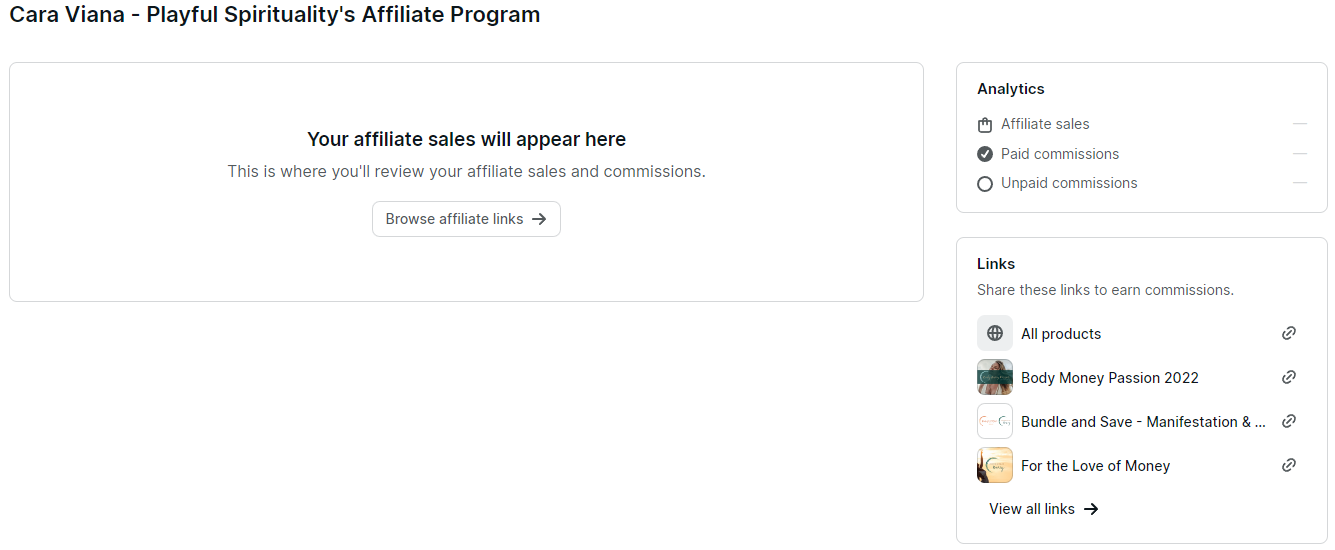
Do you see the list of products under the label "Links"? Clink on the little link symbol next to the product you would like to share, to copy the special link to your clipboard. Then paste it where ever you'd like.
If you would like to send them to ALL of Cara's products, choose the "All products" link option from the top of the list.
How your links work:
You may notice that the link you've copied is the same as Cara's normal product links, except it now has a special code at the end of it. That code is your personal Affiliate ID in our system.
All Products Example Link: https://caraviana.podia.com/a/03o85
Here the "03o85" is the Affiliate ID.
This code works by placing a cookie in the person's internet browser when they click on it. That cookie let's Podia know you are going to receive an affiliate commission when they check out, and usually lasts on their device for 90 days (unless they delete all of their cookies).
What happens if they don't use your link?
Just let us know if someone you referred made a purchase and isn't being counted towards your account. We'll fix it on our end, but it may take a few days for processing.